Discovery
DiscoveryPolicy discovers images from external sources. CachedImageSet consumes the discovered list and materializes CachedImage resources.
Why This Exists
Discovery came from operational pain:
- CI bursts created pull storms where many nodes pulled the same large images at once
- Registry rate limits and transient outages amplified cold-start latency
- Hand-maintained image lists became stale and missed newly hot images
- Node rotation (e.g. Cluster API MachineDeployments rolling new nodes daily or weekly) means fresh nodes start with empty image caches — every rotation triggers a full re-pull of all active images
DiscoveryPolicy continuously refreshes image candidates from usage signals and passes the ranked output to CachedImageSet.
How Discovery Works
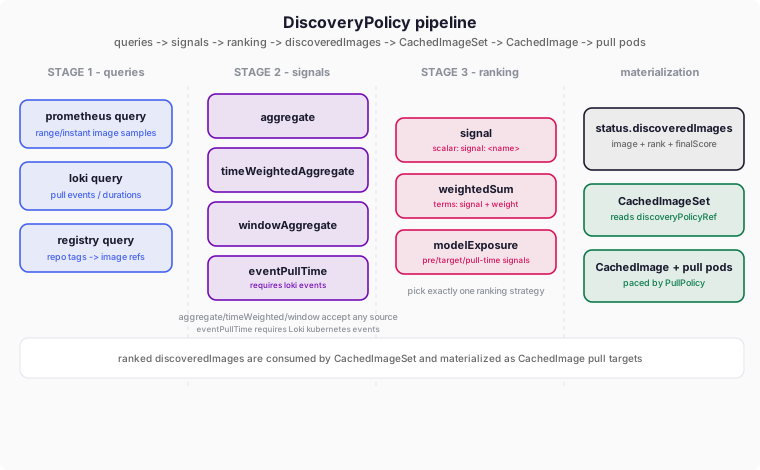
Queries feed signals, signals feed a single ranking strategy, and the ranked list is written to status.discoveredImages — consumed by CachedImageSet to create CachedImage resources that nodes pull.
| Stage | Purpose | Available types |
|---|---|---|
| Queries | Fetch raw observations from a backend | prometheus · loki · registry |
| Signals | Reduce a query series to one value per image | aggregate · timeWeightedAggregate · windowAggregate · eventPullTime |
| Ranking | Order images into the final list | signal · weightedSum · modelExposure |
The output lands in status.discoveredImages; CachedImageSet reads it and creates/deletes CachedImage children that nodes pull.
Stage 1 — Queries
A query fetches raw observations and is referenced by name from signals.
All snippets below are complete DiscoveryPolicy resources with minimal companion
signals/ranking so you can apply them directly.
| Type | Source | Discovered from | Use when |
|---|---|---|---|
prometheus | Metrics series | image label on results | Usage/concurrency from cluster metrics |
loki | Event logs | parsed pull events | Pull durations & image sizes |
registry | Tag/catalog API | repository tags | Pre-cache newest tags by name |
Prometheus Query
Definition. Runs a PromQL query against any Prometheus-compatible API and turns each returned series into a candidate image. The result must have an image label — that value becomes the image reference.
How it’s used in the CRD
apiVersion: drop.corewire.io/v1alpha1
kind: DiscoveryPolicy
metadata:
  name: prometheus-query-example
spec:
  syncInterval: 1h            # how often the whole pipeline re-runs
  maxImages: 30               # keep only the top 30 ranked images
  # STAGE 1: fetch raw data
  queries:
    - name: runner-image-usage   # unique id; referenced by signals[].query
      type: prometheus
      prometheus:
        endpoint: https://mimir.example.com   # any Prometheus-compatible API
        queryType: range        # range = samples over time | instant = single point
        lookback: 168h          # look back 7 days (range queries only)
        step: 1m                # smaller step = more samples + more backend load
        query: |
          # Result must expose an image label — Discovery keys every image by it.
          count(
            container_memory_working_set_bytes{
              container!="", container!="POD",
              namespace="gitlab-runner", pod=~"runner-.*"
            }
          ) by (image)
  # STAGE 2: reduce the series to one number per image
  signals:
    - name: total-usage         # signal name, referenced by ranking below
      query: runner-image-usage  # which query's data to consume
      type: aggregate
      aggregate:
        method: sum             # sum all samples = total activity per image
  # STAGE 3: order the images
  ranking:
    strategy: signal
    signal: total-usage         # sort purely by the total-usage signal
What happens to our query
... by (image) makes Prometheus return one time series per image. A range query samples each series across lookback, one point every step. Discovery reads the raw response:
{
  "data": { "result": [
    { "metric": { "image": "img-A" }, "values": [[t0, "1"], [t1, "2"], [t2, "6"]] },
    { "metric": { "image": "img-B" }, "values": [[t1, "1"], [t2, "3"]] }
  ]}
}
We use this 48h sample (hourly, two days, midday peaks) as the running example for every Prometheus signal below. The total-usage signal sums each series into one value:
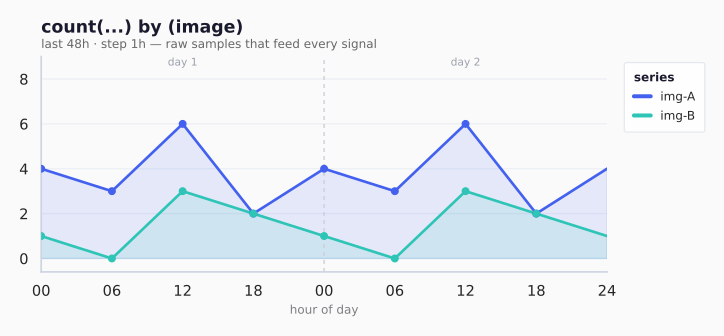
| Series | Pattern | sum | rank |
|---|---|---|---|
| img-A | midday peaks, low at night | 30 | 1 |
| img-B | small midday bumps | 12 | 2 |
| Field | Controls | Default |
|---|---|---|
queryType | range = window of samples · instant = one point now | range |
lookback | how far back the window reaches (ignored for instant) | — |
step | spacing between samples; smaller = more points, heavier query | 5m |
Field semantics: DiscoveryPrometheusQuery.
Loki Query
apiVersion: drop.corewire.io/v1alpha1
kind: DiscoveryPolicy
metadata:
  name: loki-query-example
spec:
  syncInterval: 1h
  maxImages: 30
  queries:
    - name: image-pull-events    # referenced by eventPullTime signal
      type: loki
      loki:
        endpoint: https://loki.example.com
        queryType: range         # only supported Loki query mode currently
        lookback: 168h
        query: |
          # Successful pulls carry pull duration and image size in the message.
          {job="kubernetes-events", namespace="gitlab-runner"}
          | json
          | involvedObject_name =~ "runner-.*"
          | reason = "Pulled"
        parser:
          type: kubernetesEvents # maps log fields into structured event records
          podField: involvedObject_name  # which field holds the pod name
          reasonField: reason            # only Pulled events are consumed
          messageField: message          # free-text event message
          imageField: message            # image ref is extracted from the message
  signals:
    - name: avg-cold-pull-time
      query: image-pull-events
      type: eventPullTime
      eventPullTime:
        metric: pullTime       # default; aggregates pull duration samples
        statistic: avg          # mean pull duration per image
  ranking:
    strategy: signal
    signal: avg-cold-pull-time   # slowest images rank highest
How it’s used: Loki contributes pull lifecycle data, not usage volume. The
kubernetesEvents parser turns each Pulled event into a structured record
with podField, reasonField, and messageField, then extracts the image
from imageField (typically the same message text).
Alloy shipping (real cluster events):
- Use
loki.source.kubernetes_eventsforwarding toloki.write. - With
log_format: json, Alloy emits keys likename,reason,msgin the log body. Default labels arenamespace,job,instance. - Parser mapping for Alloy JSON should be
podField: name,reasonField: reason,messageField: msg,imageField: msg. - Raw event-exporter JSON usually uses
involvedObject_name+message.
What happens to our query
Loki returns streams, each with [timestamp, line] entries. With Alloy
log_format: json, each line is a JSON event:
{
  "stream": {"job": "kubelet", "namespace": "default"},
  "values": [
    ["1719400000000000000", "{\"reason\":\"Pulling\",\"name\":\"runner-1\",\"msg\":\"Pulling image \\\"docker.io/library/redis:7-alpine\\\"\"}"],
    ["1719400002000000000", "{\"reason\":\"Pulled\",\"name\":\"runner-1\",\"msg\":\"Successfully pulled image \\\"docker.io/library/redis:7-alpine\\\" in 704ms\"}"]
  ]
}
The parser extracts image + size from each Pulled entry, then builds per-image samples:
| Parsed event | Output key | Value added |
|---|---|---|
Pulled ... in 704ms | docker.io/library/redis:7-alpine | 0.704 seconds |
Pulled ... Image size: N bytes | docker.io/library/redis:7-alpine:size_bytes | N |
For eventPullTime signals, these samples are reduced by statistic
(avg/p50/p95/etc.) into one value per image.
Registry Query
apiVersion: drop.corewire.io/v1alpha1
kind: DiscoveryPolicy
metadata:
  name: registry-query-example
spec:
  syncInterval: 1h
  maxImages: 30
  queries:
    - name: registry-tags
      type: registry
      registry:
        url: https://registry.gitlab.com
        repositories:           # repos to enumerate tags from
          - gitlab-org/gitlab-runner/gitlab-runner-helper
        tagFilter: "^x86_64-v[0-9]+\\."  # only x86_64-v1. / x86_64-v2. ...
        versionPattern: "x86_64-v(.+)"  # capture group 1 is the version
        tagSeek: "x86_64-u~"    # skip straight to the x86_64-v* tags
        maxScan: 2000           # cap tags fetched per repo before filtering
        topX: 3                 # keep the 3 newest matching tags per repo
        imageTemplate: "{{.Registry}}/{{.Repository}}:{{.Tag}}"  # built image ref
      secretRef:
        name: registry-api-creds   # registry auth Secret in the operator namespace
No signals or ranking are needed: registry queries already return their
tags newest-first, so the discovered images come out pre-ranked.
How it’s used: registry discovery lists tags per repository via
/v2/<repo>/tags/list, applies tagFilter, sorts newest-first, keeps topX,
then renders full image references via imageTemplate.
Important behavior notes:
tagFilteris regex on tag names. Anchor explicitly (^...$) when needed.- Tags are sorted by version descending (newest first). Strict semver tags work
out of the box; prefixed/suffixed tags (e.g. GitLab runner helper
x86_64-v17.5.0) are handled by extracting an embedded semver substring. Tags with no parseable version fall back to registry push order.topXthen keeps the newest N. versionPattern(optional) is a regex with one capture group that pins where the version lives in the tag, e.g.x86_64-v(.+)for GitLab helper images. Use it when the default extraction picks the wrong number.tagSeek(optional) is a pagination cursor sent to the registry as thelastquery parameter. The registry lists tags lexically after this value, so you can skip large numbers of irrelevant earlier tags (e.g. tens of thousands of digest tags) without fetching them. It is not a real tag name — any string works, e.g.x86_64-u~jumps straight to thex86_64-v*tags.maxScan(optional) caps how many tags are fetched per repository before filtering. Defaults to1000. Pair it withtagSeekto fetch only the relevant range on registries with very large tag lists.imageTemplatevariables:{{.Registry}},{{.Repository}},{{.Tag}}. Default:{{.Registry}}/{{.Repository}}:{{.Tag}}.
Signal fit:
- Registry queries are self-ranking;
signals/rankingare optional and ignored for ordering. Aggregation signals are a no-op (one sample per tag). - Not compatible with
timeWeightedAggregate/windowAggregate/eventPullTime(tag snapshots are not time series).
What happens to our query
For each repository, the controller calls /v2/<repo>/tags/list, then applies
tagFilter, topX, and imageTemplate.
Example registry payload:
{"name":"gitlab-org/gitlab-runner/gitlab-runner-helper","tags":["x86_64-v17.3.0","x86_64-v17.4.0","x86_64-latest","x86_64-v17.5.0","x86_64-v17.10.0"]}With tagFilter: "^x86_64-v[0-9]+\\.", versionPattern: "x86_64-v(.+)", and
topX: 3, the newest kept tags are:
| Repository | Matching tags | Kept (topX=3) | Rendered images |
|---|---|---|---|
gitlab-org/gitlab-runner/gitlab-runner-helper | x86_64-v17.3.0, x86_64-v17.4.0, x86_64-v17.5.0, x86_64-v17.10.0 | x86_64-v17.10.0, x86_64-v17.5.0, x86_64-v17.4.0 | registry.gitlab.com/gitlab-org/gitlab-runner/gitlab-runner-helper:x86_64-v17.10.0 … :x86_64-v17.4.0 |
Note x86_64-v17.10.0 correctly ranks above x86_64-v17.5.0 (version-aware,
not lexical), and the non-versioned x86_64-latest tag is excluded by
tagFilter. Images come out newest-first, so no ranking is required.
Auth / TLS
Both query types support a secretRef for authentication and TLS:
apiVersion: drop.corewire.io/v1alpha1
kind: DiscoveryPolicy
metadata:
  name: query-auth-example
spec:
  syncInterval: 1h
  maxImages: 30
  queries:
    - name: runner-image-usage
      type: prometheus
      prometheus:
        endpoint: https://mimir.example.com
        query: ...
      secretRef:
        name: prometheus-creds  # Secret in the operator namespace (typically drop-system)
  signals:
    - name: total-usage
      query: runner-image-usage
      type: aggregate
      aggregate:
        method: sum
  ranking:
    strategy: signal
    signal: total-usage
Supported Secret keys: token, username, password, ca.crt, tls.crt, tls.key, headers.<name>.
Grafana Mimir
Mimir is a common Prometheus backend and needs two adjustments:
- Base path — Mimir serves the Prometheus API under
/prometheus, so the endpoint must include it:https://mimir.example.com/prometheus. Drop appends/api/v1/query_rangeto whatever path you provide. Omitting/prometheusyields a404 Not Found(often an nginx HTML page) from the gateway. - Tenant header — multi-tenant Mimir requires the
X-Scope-OrgIDheader to select a tenant. Provide it viasecretRefusing aheaders.X-Scope-OrgIDkey. Single-tenant deployments (anonymous auth) can skip this.
apiVersion: v1
kind: Secret
metadata:
  name: mimir-creds
  namespace: drop-system
stringData:
  headers.X-Scope-OrgID: my-tenant   # required for multi-tenant Mimir
---
apiVersion: drop.corewire.io/v1alpha1
kind: DiscoveryPolicy
metadata:
  name: mimir-example
spec:
  queries:
    - name: runner-image-usage
      type: prometheus
      prometheus:
        endpoint: https://mimir.example.com/prometheus   # note the /prometheus base path
        query: ...
      secretRef:
        name: mimir-creds
Stage 2 — Signals
A signal derives a named per-image value from exactly one query. The four types reduce the same panel differently:
| Type | Reduces to | Key knobs |
|---|---|---|
aggregate | One value over all samples | method: sum/max/avg/count/min |
timeWeightedAggregate | Weighted sum by hour-of-day | windows, weight, timezone |
windowAggregate | One sub-window only | relativeWindow or window start/end |
eventPullTime | Event metric statistic | metric: pullTime/imageSize, statistic: p50/p90/p95/avg/max/count |
Signal × source compatibility:
| Signal type | Prometheus | Loki | Registry |
|---|---|---|---|
aggregate | yes | yes | no-op |
timeWeightedAggregate | yes | yes | no |
windowAggregate | yes | yes | no |
eventPullTime | no | yes (kubernetesEvents) | no |
Registry queries return tag snapshots, not time series, so time-windowed signals are intentionally rejected. They are already self-ranked newest-first, so aggregate adds nothing and signals/ranking can be omitted entirely.
All Prometheus examples below run on this 48h dataset (sampled every 6h, both days identical):
| Series | 00 | 06 | 12 | 18 | sum/day | 48h total |
|---|---|---|---|---|---|---|
| img-A | 2 | 3 | 6 | 4 | 15 | 30 |
| img-B | 0 | 1 | 3 | 2 | 6 | 12 |
The graphics use 6h buckets (dots mark each sample) to fit the page; real queries sample every
step(e.g. 1m). The shapes and totals match the math, not the true resolution.
aggregate
Aggregates all samples per image using a single method. The method you pick
changes what “wins” — same data, different score:
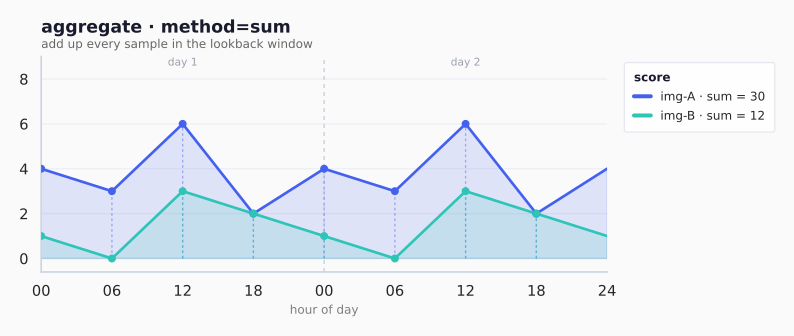
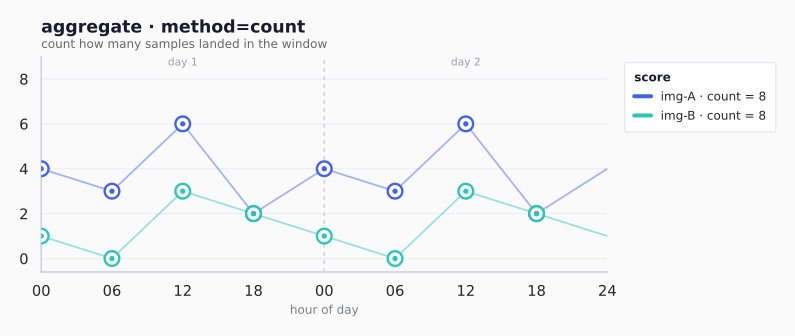
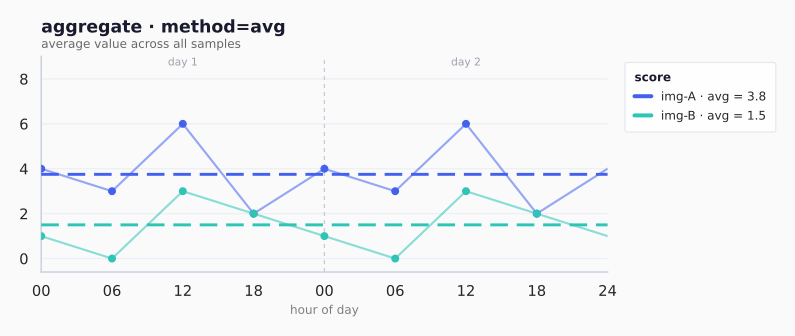
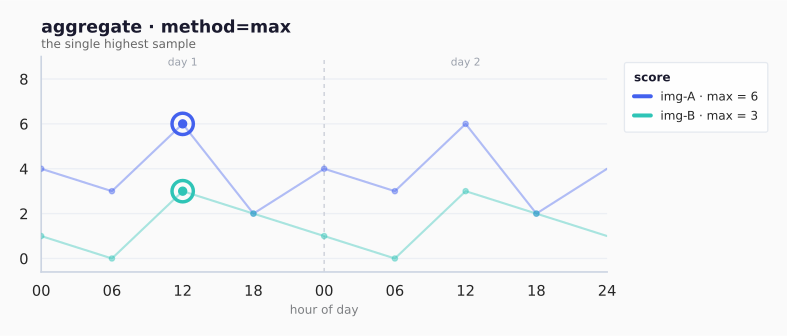
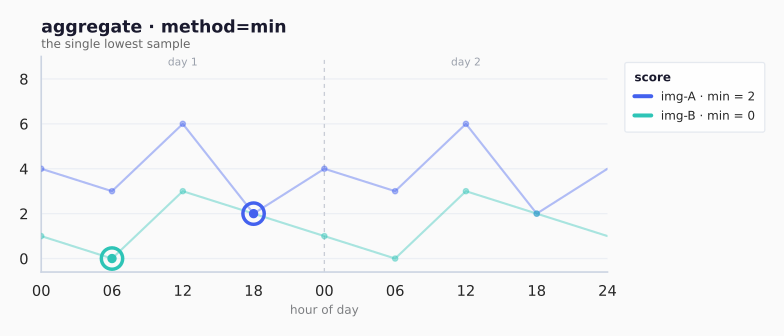
On the shared dataset, sum makes total volume win regardless of when it
happened: img-A → 30, img-B → 12.
method | Reduces to | img-A | img-B | Best for |
|---|---|---|---|---|
sum | Total of all samples | 30 | 12 | total activity / volume |
max | Largest single sample | 6 | 3 | peak concurrency / bursts |
avg | Mean across samples | 3.8 | 1.5 | typical load |
min | Smallest single sample | 2 | 0 | always-on baseline |
count | Number of samples | 8 | 8 | how often it was seen |
apiVersion: drop.corewire.io/v1alpha1
kind: DiscoveryPolicy
metadata:
  name: aggregate-signal-example
spec:
  syncInterval: 1h
  maxImages: 30
  queries:
    - name: runner-image-usage
      type: prometheus
      prometheus:
        endpoint: https://mimir.example.com
        queryType: range
        lookback: 168h
        step: 1m
        query: count(container_memory_working_set_bytes{container!="",container!="POD"}) by (image)
  signals:
    - name: total-usage
      query: runner-image-usage
      type: aggregate
      aggregate:
        method: sum    # sum | max | avg | count | min (sum = total activity)

    - name: peak-concurrency
      query: runner-image-usage
      type: aggregate
      aggregate:
        method: max             # captures burst behavior
  ranking:
    strategy: signal
    signal: total-usage
timeWeightedAggregate
Multiplies each sample value by a per-hour window weight before aggregation.
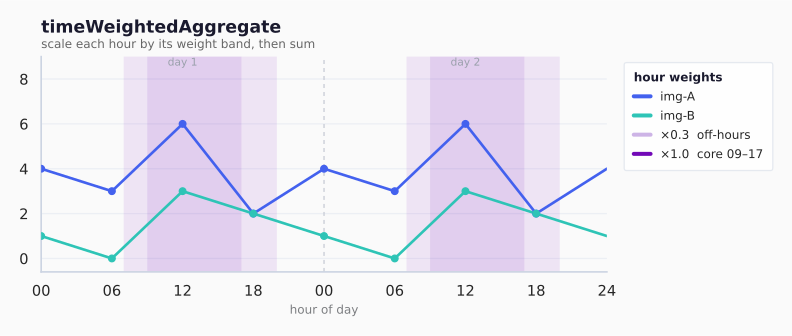
On the shared dataset: midday bars (×1.0) keep full value, shoulder bars (×0.3) shrink, off-hours (×0) vanish. img-A keeps most of its 30 because its peaks land in core hours; img-B fades further. Business-hour usage outranks 24h volume.
| Window | Hours | weight | img-A keeps | img-B keeps |
|---|---|---|---|---|
| warm-up | 07–09 | 0.3 | shoulder bars ×0.3 | shoulder bars ×0.3 |
| core | 09–17 | 1.0 | midday peak full | midday peak full |
| taper | 17–20 | 0.3 | evening ×0.3 | evening ×0.3 |
| off | else | 0 (defaultWeight) | dropped | dropped |
| total | ≈ 21 | ≈ 8 |
method accepts sum/count/avg/max/min, but sum is the only one that meaningfully uses the weights.
apiVersion: drop.corewire.io/v1alpha1
kind: DiscoveryPolicy
metadata:
  name: time-weighted-signal-example
spec:
  syncInterval: 1h
  maxImages: 30
  queries:
    - name: runner-image-usage
      type: prometheus
      prometheus:
        endpoint: https://mimir.example.com
        queryType: range
        lookback: 168h
        step: 1m
        query: count(container_memory_working_set_bytes{container!="",container!="POD"}) by (image)
  signals:
    - name: developer-weighted-usage
      query: runner-image-usage
      type: timeWeightedAggregate
      timeWeightedAggregate:
        method: sum
        timezone: Europe/Berlin # evaluate windows in local business time
        defaultWeight: "0"     # hours not listed below contribute nothing
        windows:                # weight = how much each hour-of-day counts
          - startHour: 7
            endHour: 9
            weight: "0.3"     # warm-up window = 0.3×
          - startHour: 9
            endHour: 17
            weight: "1.0"     # core hours = full weight
          - startHour: 17
            endHour: 20
            weight: "0.3"     # taper period = 0.3×
  ranking:
    strategy: signal
    signal: developer-weighted-usage
windowAggregate
Aggregates only the samples within a specific time sub-window. There are two ways to pick the window, and only one may be set per signal:
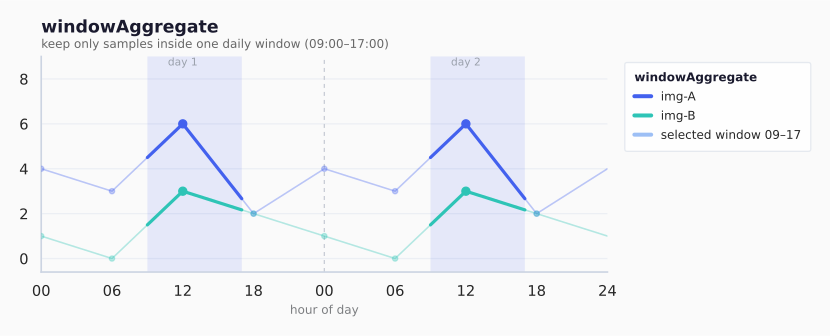
On the shared dataset: only the shaded 09:00–17:00 band counts; bars outside it are dropped before summing. img-A ≈ 6 (its 12:00 peak), img-B ≈ 3. Everything outside the window is invisible — sharper than weighting.
| Setting | Window | img-A | img-B | Use when |
|---|---|---|---|---|
relativeWindow: 2h | last 2h from now | 4 | 2 | “what is hot right now” |
window 00:00–09:00 | off-hours | 5 | 1 | overnight / batch jobs |
window 09:00–17:00 | core hours | 6 | 3 | protect active workday |
method accepts sum/count/avg/max/min (default sum). Set either relativeWindow or window+timezone — never both.
relativeWindow— “the last N hours from now”, measured in UTC. No timezone needed.window— fixed clock hours of the day (e.g. 09:00–17:00). You must also settimezone; those hours are read in that zone. The policy errors if it is missing.
apiVersion: drop.corewire.io/v1alpha1
kind: DiscoveryPolicy
metadata:
  name: window-aggregate-signal-example
spec:
  syncInterval: 1h
  maxImages: 30
  queries:
    - name: runner-image-usage
      type: prometheus
      prometheus:
        endpoint: https://mimir.example.com
        queryType: range
        lookback: 168h
        step: 1m
        query: count(container_memory_working_set_bytes{container!="",container!="POD"}) by (image)
  signals:
    # Relative window: just the last 2 hours of samples (clock zone irrelevant)
    - name: recent-usage
      query: runner-image-usage
      type: windowAggregate
      windowAggregate:
        method: sum
        relativeWindow: 2h      # good for "what is hot right now"

    # Wall-clock window: 00:00–09:00 every day, read in the timezone below
    - name: pre-window-usage
      query: runner-image-usage
      type: windowAggregate
      windowAggregate:
        method: sum
        timezone: Europe/Berlin  # REQUIRED with window; start/end are Berlin local time
        window:
          start: "00:00"       # inclusive
          end: "09:00"         # exclusive

    # Wall-clock window: 09:00–17:00 Berlin (the active period to protect)
    - name: target-window-usage
      query: runner-image-usage
      type: windowAggregate
      windowAggregate:
        method: sum
        timezone: Europe/Berlin  # REQUIRED with window
        window:
          start: "09:00"
          end: "17:00"
  ranking:
    strategy: signal
    signal: recent-usage
eventPullTime
Derives image pull-time statistics from Loki event records. The kubelet emits a Pulled event for every image pull, carrying the pull duration. Drop collects all Pulled events for each image within the lookback window and treats them as the sample set.
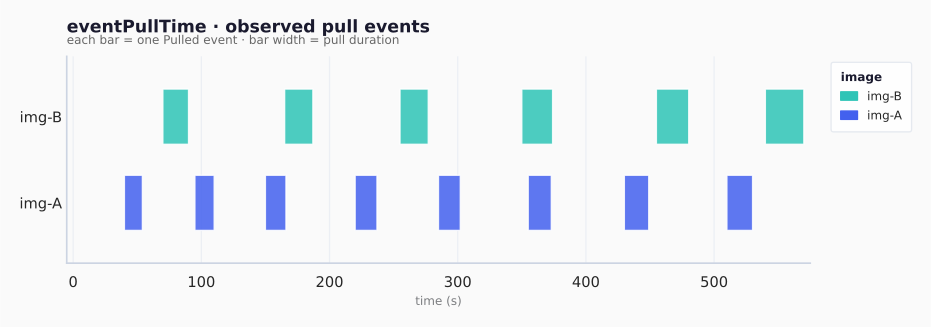
The statistic field reduces these samples to one ranking value per image. Slower images rank higher:
How to read the statistic charts:
- each row is one image (
img-Aandimg-B) - the box spans the interquartile range (p25 to p75)
- whiskers show the spread of observed pulls
- small dots are individual pull events
- the highlighted marker is the selected statistic (vertical tick for p50/p90/p95/avg, ring for max,
n=label for count)
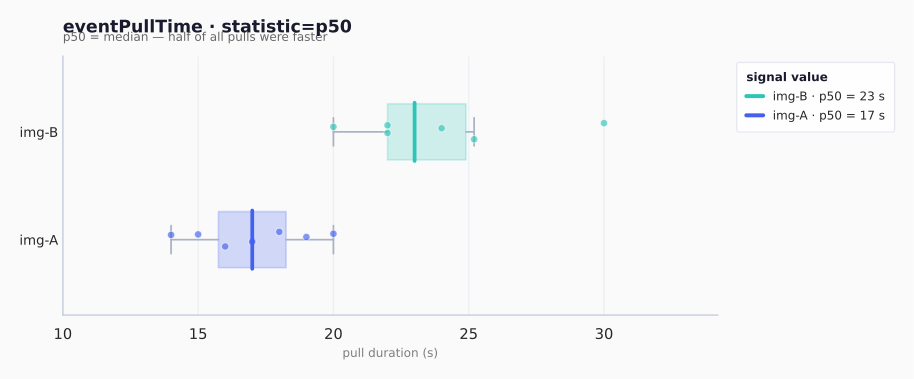
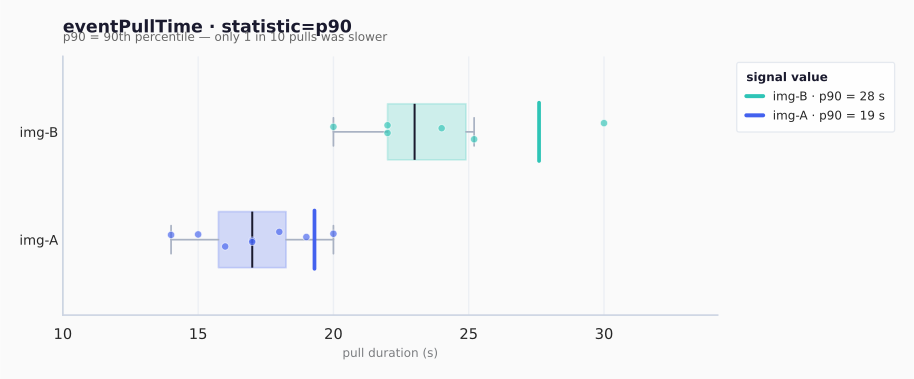
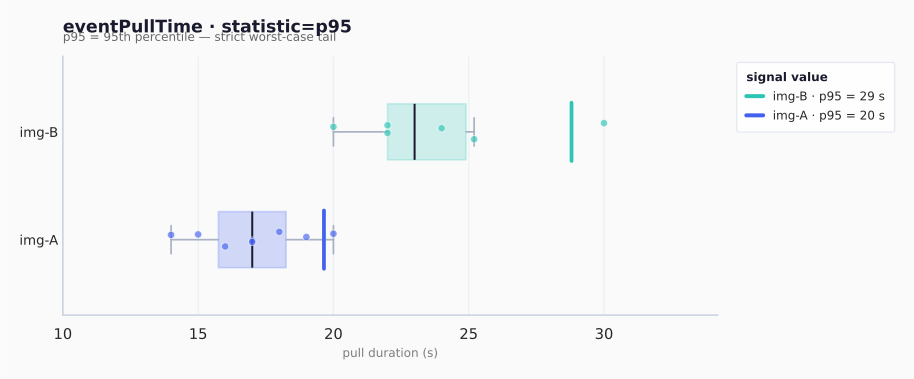
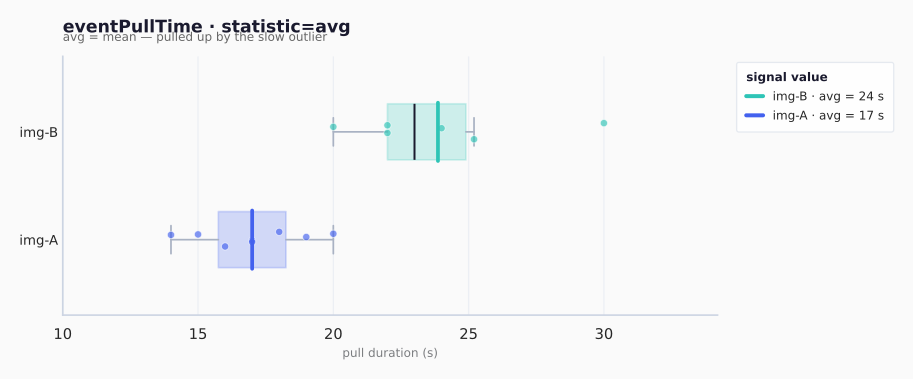
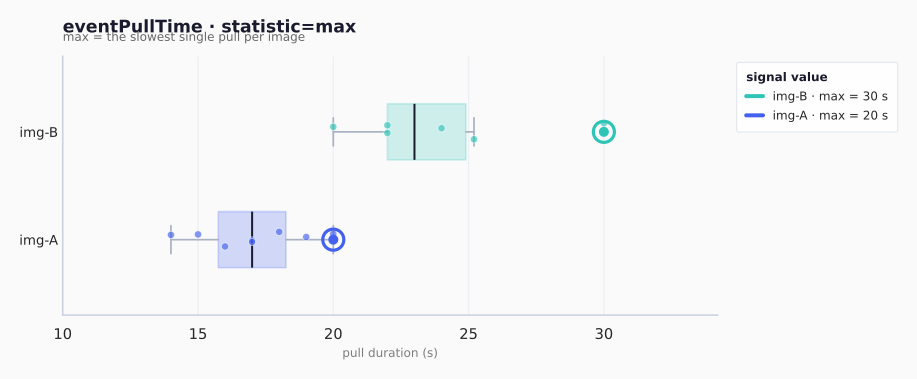
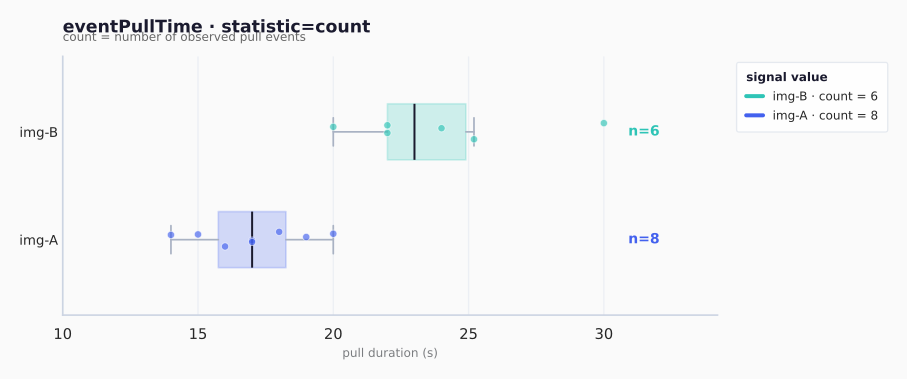
Pick p50 as the default: it ranks by typical pull latency and is robust to a single slow outlier. Use p90/p95 when SLO tail latency matters; max for strict worst-case provisioning.
statistic | Reduces to | nginx (8 events) | redis (6 events) | Best for |
|---|---|---|---|---|
p50 | median | 17 s | 23 s | typical latency, robust to outliers |
p90 | slow tail | 19 s | 28 s | worst-case planning |
p95 | slower tail | 20 s | 29 s | strict SLOs |
avg | mean | 17 s | 24 s | overall cost (skewed by outliers) |
max | slowest pull | 20 s | 30 s | absolute worst pull |
count | pull events | 8 | 6 | how often pulled cold |
eventPullTime uses metric + statistic, both derived from Pulled events:
metric: pullTime(default) withstatistic: p50|p90|p95|avg|max|countmetric: imageSizewithstatistic: p50|p90|p95|avg|max|count(bytes fromImage size: N bytes)
apiVersion: drop.corewire.io/v1alpha1
kind: DiscoveryPolicy
metadata:
  name: event-pull-time-signal-example
spec:
  syncInterval: 1h
  maxImages: 30
  queries:
    - name: image-pull-events
      type: loki
      loki:
        endpoint: https://loki.example.com
        queryType: range
        lookback: 168h
        query: |
          {job="kubernetes-events", namespace="gitlab-runner"}
          | json
          | reason = "Pulled"
        parser:
          type: kubernetesEvents
          podField: involvedObject_name
          reasonField: reason
          messageField: message
          imageField: message
  signals:
    - name: avg-cold-pull-time
      query: image-pull-events
      type: eventPullTime
      eventPullTime:
        metric: pullTime          # pullTime (default) | imageSize
        statistic: avg            # p50 | p90 | p95 | avg | max | count
  ranking:
    strategy: signal
    signal: avg-cold-pull-time
Rank by image size (bytes) from the same Pulled events:
signals:
  - name: avg-image-size
    query: image-pull-events
    type: eventPullTime
    eventPullTime:
      metric: imageSize
      statistic: avg

ranking:
  strategy: signal
  signal: avg-image-size
Stage 3 — Ranking
Exactly one ranking strategy per policy.
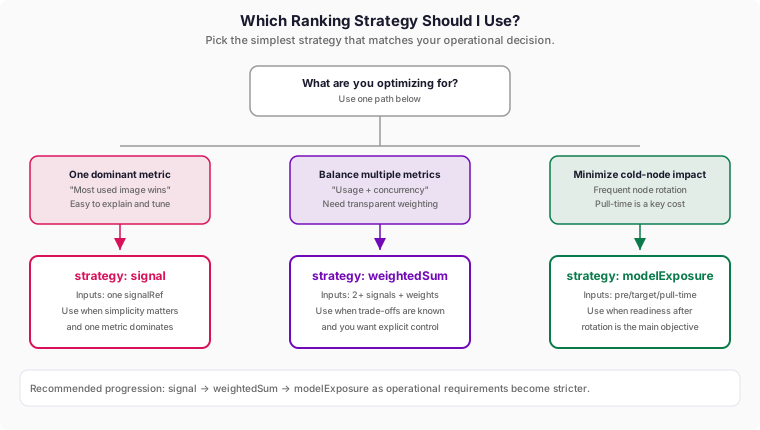
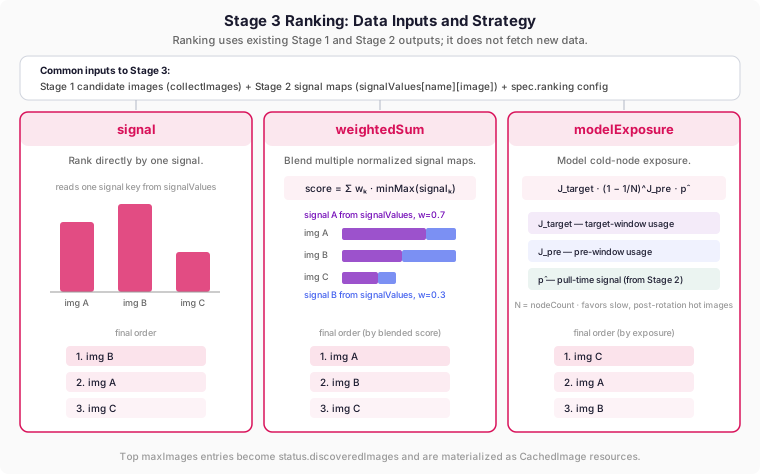
Input to Stage 3 is always:
- Candidate image set from Stage 1 queries (
collectImagesfrom query results). - Per-image signal values from Stage 2 (
signalValues[signalName][image]). - Ranking config from
spec.ranking.
Ranking does not fetch new data sources by itself. It only combines values already produced by Stages 1 and 2.
Where Ranking Data Comes From
| Strategy | Reads from Stage 1 | Reads from Stage 2 | Extra config input |
|---|---|---|---|
signal | Candidate image list | One signal map selected by ranking.signal | none |
weightedSum | Candidate image list | Multiple signal maps listed in ranking.weightedSum.signals[].name | Per-signal weights |
modelExposure | Candidate image list | Three signal maps referenced by targetSignal, preSignal, pullTimeSignal | Node count (nodes) |
If a referenced signal name is missing, the image score falls back to 0 for that term (or to default/fallback ordering when no ranking config is usable).
signal
Ranks images directly by the value of a single signal.
apiVersion: drop.corewire.io/v1alpha1
kind: DiscoveryPolicy
metadata:
  name: signal-ranking-example
spec:
  syncInterval: 1h
  maxImages: 30
  queries:
    - name: runner-image-usage
      type: prometheus
      prometheus:
        endpoint: https://mimir.example.com
        queryType: range
        lookback: 168h
        step: 1m
        query: count(container_memory_working_set_bytes{container!="",container!="POD"}) by (image)
  signals:
    - name: total-usage
      query: runner-image-usage
      type: aggregate
      aggregate:
        method: sum
  ranking:
    strategy: signal
    signal: total-usage    # simplest strategy: sort by one signal
weightedSum
Use this when you have multiple useful signals and want one final rank.
How it works:
- Compute each signal per image.
- Normalize each signal to
0..1(so different units can be compared). - Multiply each normalized signal by its weight.
- Add the weighted terms; higher final score ranks first.
In plain terms: weightedSum answers “how good is this image across all criteria, given my priorities?”
Quick example (two signals):
- normalized
total-usage(img-A)=0.90,peak-concurrency(img-A)=0.40 - weights:
0.7and0.3 - score:
0.7*0.90 + 0.3*0.40 = 0.75
So img-A gets score 0.75; images with larger scores rank above it.
apiVersion: drop.corewire.io/v1alpha1
kind: DiscoveryPolicy
metadata:
  name: weighted-sum-ranking-example
spec:
  syncInterval: 1h
  maxImages: 30
  # STAGE 1: fetch raw data
  queries:
    - name: runner-image-usage
      type: prometheus
      prometheus:
        endpoint: https://mimir.example.com
        queryType: range
        lookback: 168h
        step: 1m
        query: count(container_memory_working_set_bytes{container!="",container!="POD"}) by (image)
  # STAGE 2: two signals to balance
  signals:
    - name: total-usage          # sustained activity
      query: runner-image-usage
      type: aggregate
      aggregate:
        method: sum
    - name: peak-concurrency     # burst behavior
      query: runner-image-usage
      type: aggregate
      aggregate:
        method: max
  # STAGE 3: blend the two
  ranking:
    strategy: weightedSum
    weightedSum:
      normalize: minMax      # required for mixed units (counts, seconds, bytes)
      missingSignal: zero    # zero | drop ; drop excludes images missing any term
      terms:                 # weight = importance (best if terms sum near 1.0)
        - signal: total-usage
          weight: "0.7"      # 70% importance
        - signal: peak-concurrency
          weight: "0.3"      # 30% importance
Field semantics: WeightedSumRankingConfig.
modelExposure
Use this when node rotation matters and you want to protect a specific future window (for example, business hours) from cold-pull latency.
What it models:
targetWindowUsageSignal: how much the image will be used in the window you care about.preWindowUsageSignal: how much warmup happened before that window.nodeCount: larger clusters keep cache spread longer.pullTimeSignal: slower cold pulls are more expensive and get higher priority.
In plain terms: images that are busy in the target window, not sufficiently warmed up before it, and expensive to pull cold will rank highest.
apiVersion: drop.corewire.io/v1alpha1
kind: DiscoveryPolicy
metadata:
  name: model-exposure-ranking-example
spec:
  syncInterval: 1h
  maxImages: 30
  queries:
    - name: runner-image-usage
      type: prometheus
      prometheus:
        endpoint: https://mimir.example.com
        queryType: range
        lookback: 168h
        step: 1m
        query: count(container_memory_working_set_bytes{container!="",container!="POD"}) by (image)
    - name: image-pull-events
      type: loki
      loki:
        endpoint: https://loki.example.com
        queryType: range
        lookback: 168h
        query: |
          {job="kubernetes-events", namespace="gitlab-runner"}
          | json
          | reason = "Pulled"
        parser:
          type: kubernetesEvents
          podField: involvedObject_name
          reasonField: reason
          messageField: message
          imageField: message
  signals:
    - name: pre-window-usage
      query: runner-image-usage
      type: windowAggregate
      windowAggregate:
        method: sum
        timezone: Europe/Berlin
        window:
          start: "00:00"
          end: "09:00"
    - name: target-window-usage
      query: runner-image-usage
      type: windowAggregate
      windowAggregate:
        method: sum
        timezone: Europe/Berlin
        window:
          start: "09:00"
          end: "17:00"
    - name: avg-cold-pull-time
      query: image-pull-events
      type: eventPullTime
      eventPullTime:
        metric: pullTime
        statistic: avg
  ranking:
    strategy: modelExposure
    modelExposure:
      nodes:
        count: 100                           # N: total nodes in the cluster
      preWindowUsageSignal: pre-window-usage  # J_pre: warmup before target window
      targetWindowUsageSignal: target-window-usage # J_target: demand during target window
      pullTimeSignal: avg-cold-pull-time      # p-hat: cold-pull penalty (slower = larger)
Score formula:
Interpretation of the formula:
- first factor boosts images heavily used in the target window
- middle factor discounts images already warmed before the window
- last factor boosts images with expensive cold pulls
Setting N (node count): the nodes block takes a static count, a dynamic selector, or both.
nodes.count: a fixed integer. Best for static clusters.nodes.selector: a standard Kubernetes node selector (the same shape used by node affinity’snodeSelectorTerms). The operator counts Ready nodes that match it via the Kubernetes API at every sync, so N tracks autoscaling and node rotation automatically. Terms are ORed; within a term,matchExpressions(node labels) andmatchFields(e.g.metadata.name) are ANDed. A nil selector counts all Ready nodes. When both are set, the selector wins andcountis the fallback used only if node discovery fails (otherwise N=1).
Selection is by labels and fields — it does not evaluate taints (taints are handled via tolerations, not selection). Common selector labels: node-role.kubernetes.io/control-plane (exclude masters), node.kubernetes.io/instance-type, topology.kubernetes.io/zone, or pool labels like karpenter.sh/nodepool and cloud.google.com/gke-nodepool.
Dynamic node count example (replace the nodes: block above):
  ranking:
    strategy: modelExposure
    modelExposure:
      nodes:
        selector:                            # N = live count of matching Ready nodes
          nodeSelectorTerms:
            - matchExpressions:
                - key: node-role.kubernetes.io/control-plane
                  operator: DoesNotExist     # workers only (control-plane is NoSchedule)
        count: 50                            # fallback if node discovery fails (optional)
      preWindowUsageSignal: pre-window-usage
      targetWindowUsageSignal: target-window-usage
      pullTimeSignal: avg-cold-pull-time
Field semantics: ModelExposureRankingConfig.
Complete Examples
Example 1: Total Usage (simplest)
apiVersion: drop.corewire.io/v1alpha1
kind: DiscoveryPolicy
metadata:
  name: total-usage
spec:
  syncInterval: 1h   # rerun pipeline every hour
  maxImages: 30      # keep top 30 ranked images

  queries:
    - name: runner-image-usage
      type: prometheus
      prometheus:
        endpoint: https://mimir.example.com
        queryType: range
        lookback: 168h
        step: 1m
        query: |
          count(
            container_memory_working_set_bytes{
              container!="", container!="POD",
              namespace="gitlab-runner", pod=~"runner-.*"
            }
          ) by (image)

  signals:
    - name: total-usage
      query: runner-image-usage
      type: aggregate
      aggregate:
        method: sum  # total usage in lookback window

  ranking:
    strategy: signal
    signal: total-usage
Example 2: Hybrid Usage + Peak Concurrency
apiVersion: drop.corewire.io/v1alpha1
kind: DiscoveryPolicy
metadata:
  name: gitlab-hybrid-usage-concurrency
spec:
  syncInterval: 1h
  maxImages: 30

  queries:
    - name: runner-image-usage
      type: prometheus
      prometheus:
        endpoint: https://mimir.example.com
        queryType: range
        lookback: 168h
        step: 1m
        query: |
          count(
            container_memory_working_set_bytes{
              container!="", container!="POD",
              namespace="gitlab-runner", pod=~"runner-.*"
            }
          ) by (image)

  signals:
    - name: total-usage
      query: runner-image-usage
      type: aggregate
      aggregate:
        method: sum

    - name: peak-concurrency
      query: runner-image-usage
      type: aggregate
      aggregate:
        method: max

  ranking:
    strategy: weightedSum
    weightedSum:
      normalize: minMax
      missingSignal: zero
      terms:
        - signal: total-usage
          weight: "0.7" # prioritize sustained usage
        - signal: peak-concurrency
          weight: "0.3" # still account for bursts
Example 3: Developer-Time Weighted Usage
apiVersion: drop.corewire.io/v1alpha1
kind: DiscoveryPolicy
metadata:
  name: gitlab-developer-and-burst
spec:
  syncInterval: 1h
  maxImages: 30

  queries:
    - name: runner-image-usage
      type: prometheus
      prometheus:
        endpoint: https://mimir.example.com
        queryType: range
        lookback: 168h
        step: 1m
        query: |
          count(
            container_memory_working_set_bytes{
              container!="", container!="POD",
              namespace="gitlab-runner", pod=~"runner-.*"
            }
          ) by (image)

  signals:
    - name: developer-weighted-usage
      query: runner-image-usage
      type: timeWeightedAggregate
      timeWeightedAggregate:
        method: sum
        timezone: Europe/Berlin
        defaultWeight: "0"   # off-hours ignored by default
        windows:
          - startHour: 7
            endHour: 9
            weight: "0.3"
          - startHour: 9
            endHour: 17
            weight: "1.0"
          - startHour: 17
            endHour: 20
            weight: "0.3"

    - name: peak-concurrency
      query: runner-image-usage
      type: aggregate
      aggregate:
        method: max

  ranking:
    strategy: weightedSum
    weightedSum:
      normalize: minMax
      missingSignal: zero
      terms:
        - signal: developer-weighted-usage
          weight: "0.7"
        - signal: peak-concurrency
          weight: "0.3"
Example 4: Model-Aware Exposure
apiVersion: drop.corewire.io/v1alpha1
kind: DiscoveryPolicy
metadata:
  name: gitlab-model-exposure
spec:
  syncInterval: 1h
  maxImages: 30

  queries:
    - name: runner-image-usage
      type: prometheus
      prometheus:
        endpoint: https://mimir.example.com
        queryType: range
        lookback: 168h
        step: 1m
        query: |
          count(
            container_memory_working_set_bytes{
              container!="", container!="POD",
              namespace="gitlab-runner", pod=~"runner-.*"
            }
          ) by (image)

    - name: image-pull-events
      type: loki
      loki:
        endpoint: https://loki.example.com
        queryType: range
        lookback: 168h
        query: |
          {job="kubernetes-events", namespace="gitlab-runner"}
          | json
          | involvedObject_name =~ "runner-.*"
          | reason = "Pulled"
        parser:
          type: kubernetesEvents
          podField: involvedObject_name
          reasonField: reason
          messageField: message
          imageField: message

  signals:
    - name: pre-window-usage
      query: runner-image-usage
      type: windowAggregate
      windowAggregate:
        method: sum
        timezone: Europe/Berlin   # window hours below are Berlin local time
        window:
          start: "00:00" # prior window
          end: "09:00"

    - name: target-window-usage
      query: runner-image-usage
      type: windowAggregate
      windowAggregate:
        method: sum
        timezone: Europe/Berlin   # window hours below are Berlin local time
        window:
          start: "09:00" # target active window
          end: "17:00"

    - name: avg-cold-pull-time
      query: image-pull-events
      type: eventPullTime
      eventPullTime:
        metric: pullTime
        statistic: avg          # mean latency signal; use p95 if you need tail sensitivity

  ranking:
    strategy: modelExposure
    modelExposure:
      nodes:
        count: 100             # tune to your typical active node count
      preWindowUsageSignal: pre-window-usage
      targetWindowUsageSignal: target-window-usage
      pullTimeSignal: avg-cold-pull-time
Status and Observability
Status records query execution outcomes and the final ordered image list used by
CachedImageSet.
status:
  lastSyncTime: "2026-06-18T10:00:00Z"
  imageCount: 2

  conditions:
    - type: Ready
      status: "True"
      reason: Synced
      message: "Discovered 2 images."

  queryResults:
    - name: runner-image-usage
      type: prometheus
      status: success         # success | failed (message set on failure)

  discoveredImages:
    - image: registry.example.com/ci/java-gradle:21
      rank: 1
      finalScore: "0.8768"
    - image: registry.example.com/ci/node:20
      rank: 2
finalScore: "0.5210"| Field | Meaning |
|---|---|
conditions[Ready] | reason=Synced once the pipeline runs successfully; message summarizes the result |
imageCount | Number of discovered images (also a print column) |
queryResults[] | Per-query name · type · status · message (on failure) |
discoveredImages[] | Ordered result: image · rank (1 = highest) · finalScore |
Discovery Strategies Reference
| # | Strategy | Score formula | Signals needed |
|---|---|---|---|
| 1 | Total usage | Σ count_I(t) over W | total-usage |
| 2 | Peak same-image concurrency | max count_I(t) over W | peak-concurrency |
| 3 | Developer-time weighted usage | Σ weight(t)·count_I(t) | developer-weighted-usage |
| 4 | Recent usage | Σ count_I(t) over recent window | recent-usage |
| 5 | Hybrid usage + peak | α·norm(total) + (1-α)·norm(peak) | total-usage, peak-concurrency |
| 6 | Hybrid dev-time + peak | α·norm(dev) + (1-α)·norm(peak) | developer-weighted-usage, peak-concurrency |
| 7 | Count × pull time | total_usage(I) · p_hat(I) | total-usage, avg-cold-pull-time |
| 8 | Model-aware exposure | J_target · (1-1/N)^J_pre · p_hat | pre-window-usage, target-window-usage, avg-cold-pull-time |
Error Handling
- On transient failures, the operator keeps the last known good discovery results
- Source health is tracked via conditions on the DiscoveryPolicy status
- Each query is executed independently — one failing query does not block others